I share practical insights on AI, Claude, OpenAI, Azure, and productivity — helping creators and professionals use technology smarter, not harder.
Tips To Get Started With Azure OpenAI
Get link
Facebook
X
Pinterest
Email
Other Apps
-
If you want to explore Azure OpenAI but not sure how to get started, then you are at the right place. I've created a video, which explains everything about get your journey started. Have a look:
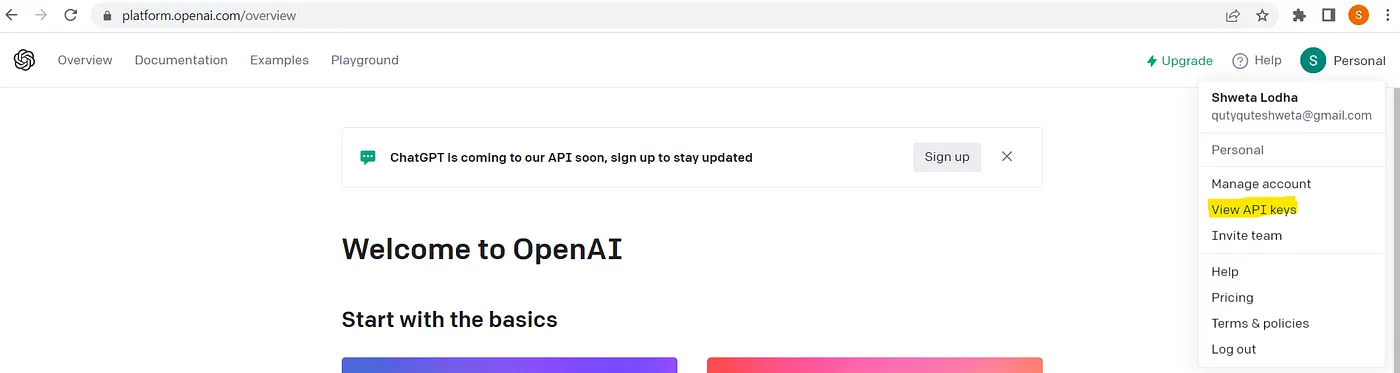
In this article, I’ll show you how can you create a basic chat bot which utilizes the data provided by you. Here we will be using GPT-Index/LlamaIndex, OpenAI and Pytho n. Let’s get started by installing the required Python module. Install modules/packages We need to install, two packages named llama-index and langchain and this can be done using below lines: pip install llama-index pip install langchain Importing packages Next, we need to import those packages so that we can use them: from llama_index import SimpleDirectoryReader , GPTListIndex , GPTVectorStoreIndex , LLMPredictor , PromptHelper , ServiceContext , StorageContext ,load_index_from_storage from langchain import OpenAI import sys import os Please note that, here, we don’t need an GPU because we are not doing anything local. All we are doing is using OpenAI server. Grab OpenAI Key To grab the OpenAI key, you need to go to https://openai.com/, login and then grab the keys using highlighted way: Once you got the...
Today I'll try to write bit on TemplateBinding and how to use it inside a ControlTemplate . TemplateBinding is a type of binding used mainly for template scenarios. Here I am not going to write more on it's theoretical aspect as what is TemplateBinding, when to use, blah blah blah, as lot of content is readily available on net. So, let's start quickly onto coding part: First of all, let's create a new project using WPF template and place a button in it as below: Now, what I am going to do is, I am going to replace this content template for this button. So, in order to do this, open up the Button tag and add Button.Template markup tag with a new ControlTemplate as: Now as soon as you will add ControlTemplate tag, you will notice that the content of the button is gone and button is shown as a transparent rectangle. This is happened because here I told WPF to replace the default ControlTemplate with the one, which I defined. But at this point, our Co...
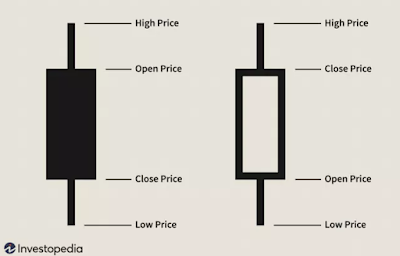
In this article, we will see how to create candlestick chart with historical data for any given symbol using open financial API named Yahoo Finance and Python. We will start by pushing data in a CSV file and then we will use Plotly to create the candlestick chart in Python. Introduction to candlestick chart This is one of the heavily used charts you may have seen multiple times while dealing with stock market dashboards. This is very much used by traders as it provides price movement based on the past patterns. One candle represents 4 points: Open, Close, High, Low as shown below: In above figure, first candle is filled which depicts that open price was higher than close price. Similarly, second candle depicts that close price was higher than open price. Here do not focus on the color of candle as it can be configured based on your favorite color, based on the dashboard you are using. In general, bullish candlestick (close price > open price) is represented by ...

Comments
Post a Comment